Welcoming Users Right: NetPay’s Onboarding Overhaul
During my summer internship at NetCapital Financial Group, a leading non-banking financial institution in Mongolia and a Top 100 Enterprise in 2024, I was in charge of the redesign of the onboarding experience for their primary mobile app, NetPay. The app allows users to apply for, track, and repay online loans and was undergoing a complete visual and functional overhaul. I was given the responsibility of the onboarding flow holistically, which involved research and ideation, through wireframes and final UI, while closely working with the senior designer.
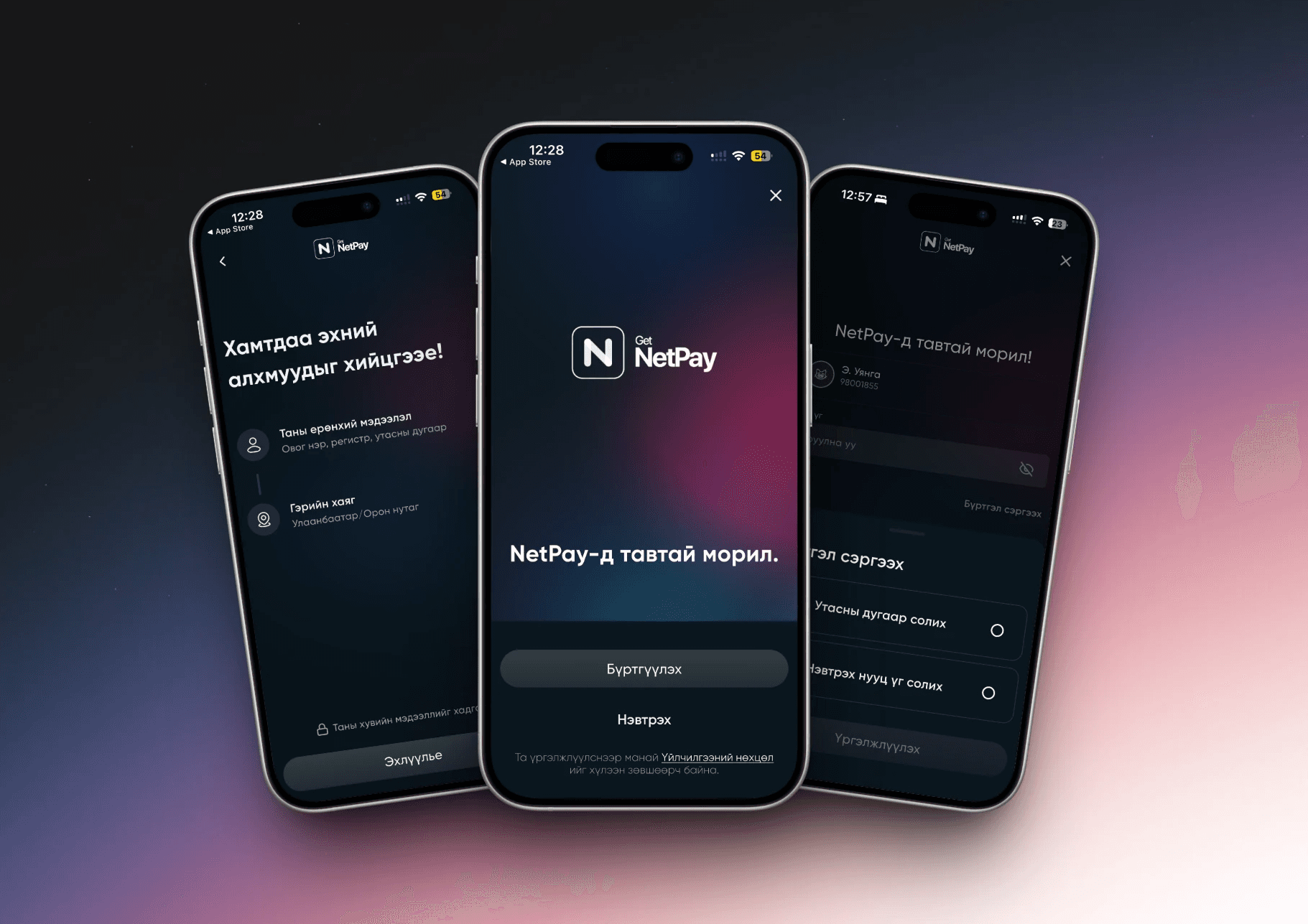
Note: NetPay by NetCapital is currently available only in Mongolia; screenshots and an annotated prototype are provided below.
Role:
UI/UX Design
UX Research
Team:
Head UI/UX Designer
Head Product Manager
NetPay Product Owner
Software Engineers
Timeline:
Summer 2025
Implementation
September 2025
Tools:
Figma
FigJam
Illustrator
Jira
Methods:
User Interviews
Funnel Analysis
Task-flow mapping
Prototyping
The Why:
Onboarding drop-off was driven by uncertainty and cognitive overload: unclear requirements, misleading UI affordances, and overloaded forms. The redesign simplifies choices, sets expectations, and breaks the process into digestible steps to reduce friction, speed time-to-first-action, and increase completion rates.
The How:
I ran a focused funnel analysis, interviewed users, and performed a heuristic audit to form a clear hypothesis: set expectations up front, collect durable identity early, and remove micro-friction. I mapped the proposed flow, designed and iterated high-fidelity screens with the Head Designer, secured Head Product Manager approval, and delivered annotated handoff specs. I also recommended A/B tests and usability studies to validate the remaining changes and quantify impact.
Problem
An Onboarding Flow That Didn’t Set Expectations
Imagine you’re in your late twenties, opening the NetPay app for the first time to apply for a loan.
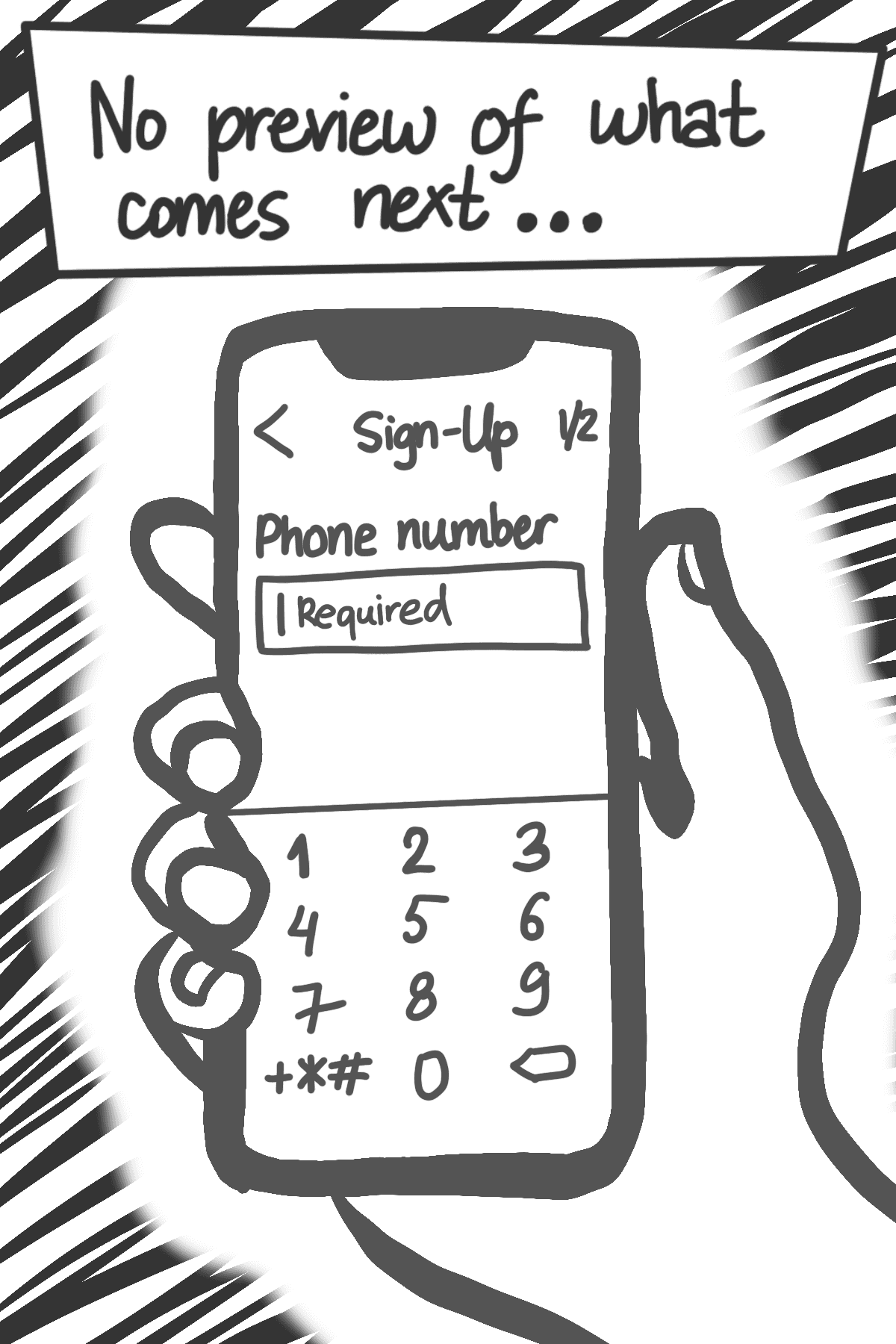
You’re ready to begin, but the first screen asks for your phone number without explaining what comes next, what information is needed, or why it’s required.
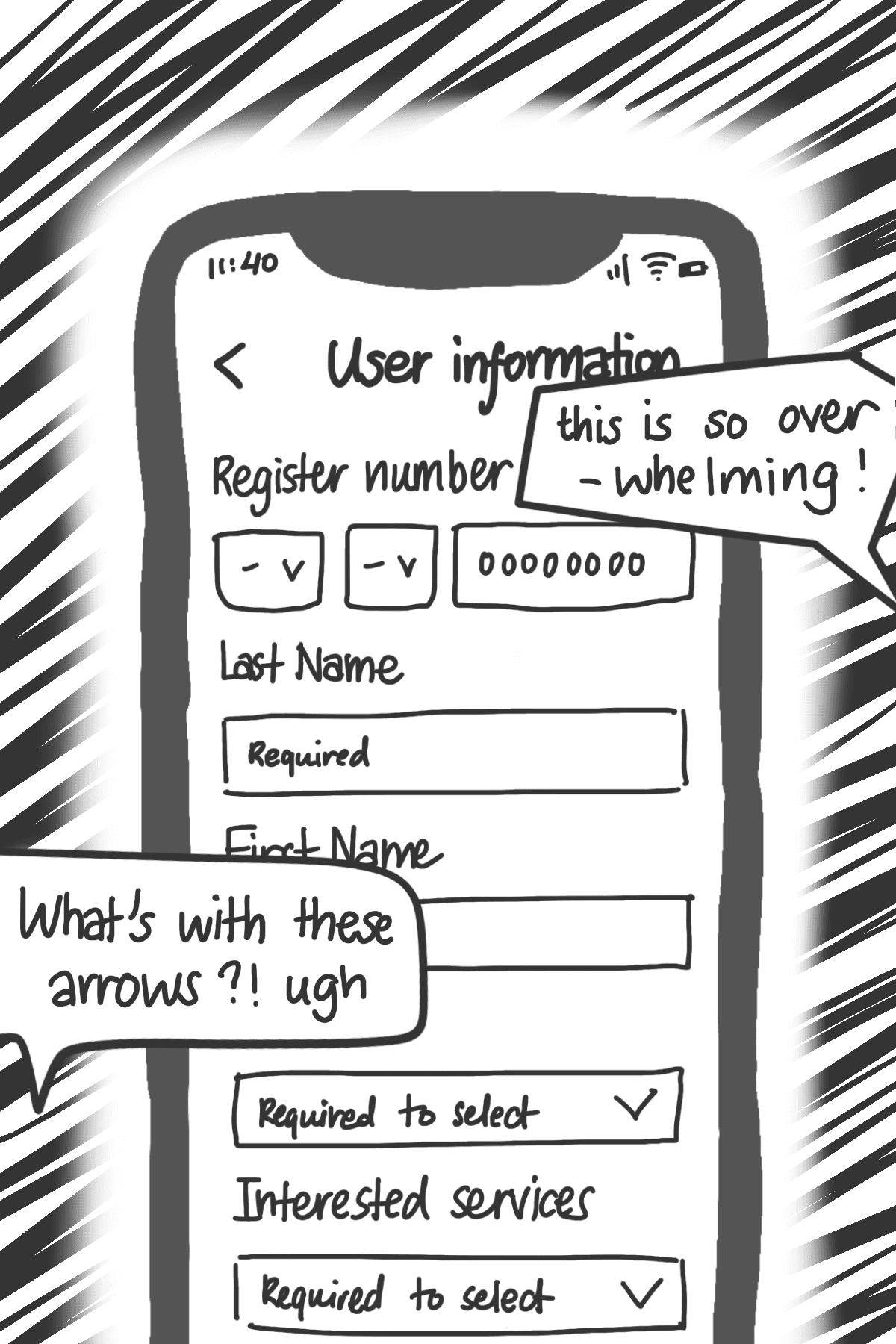
As you continue, you see long forms asking for many details at once. Arrows suggest you should navigate to another screen, but nothing happens.

So I asked the question
How might we create a transparent, low‑friction onboarding journey that builds trust by aligning with how users naturally evaluate a financial app?
Flow redesign
Mapping a Smoother Path
After identifying how the previous onboarding left users uncertain and overwhelmed, I wanted to redesign the process from a more human perspective.
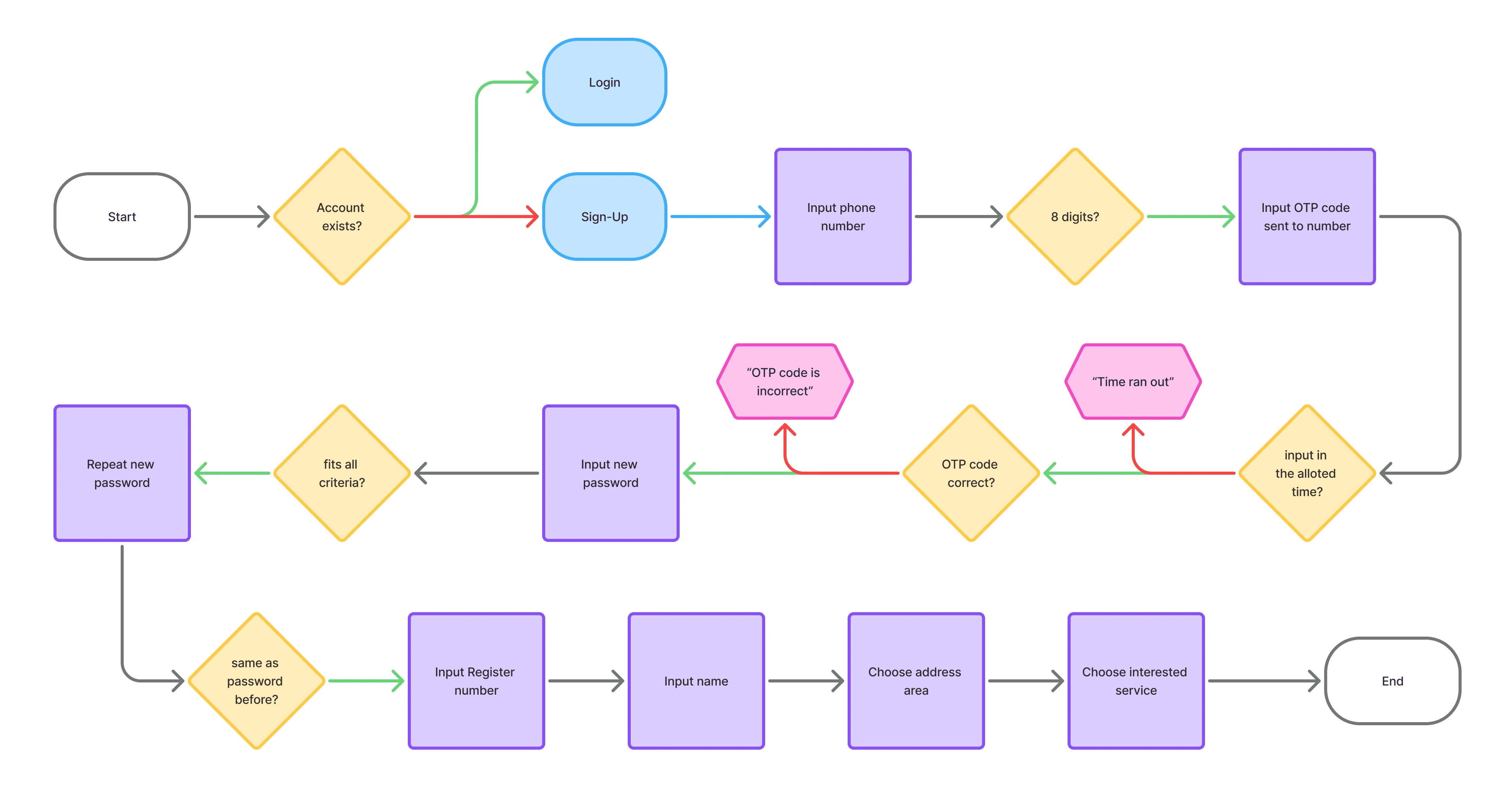
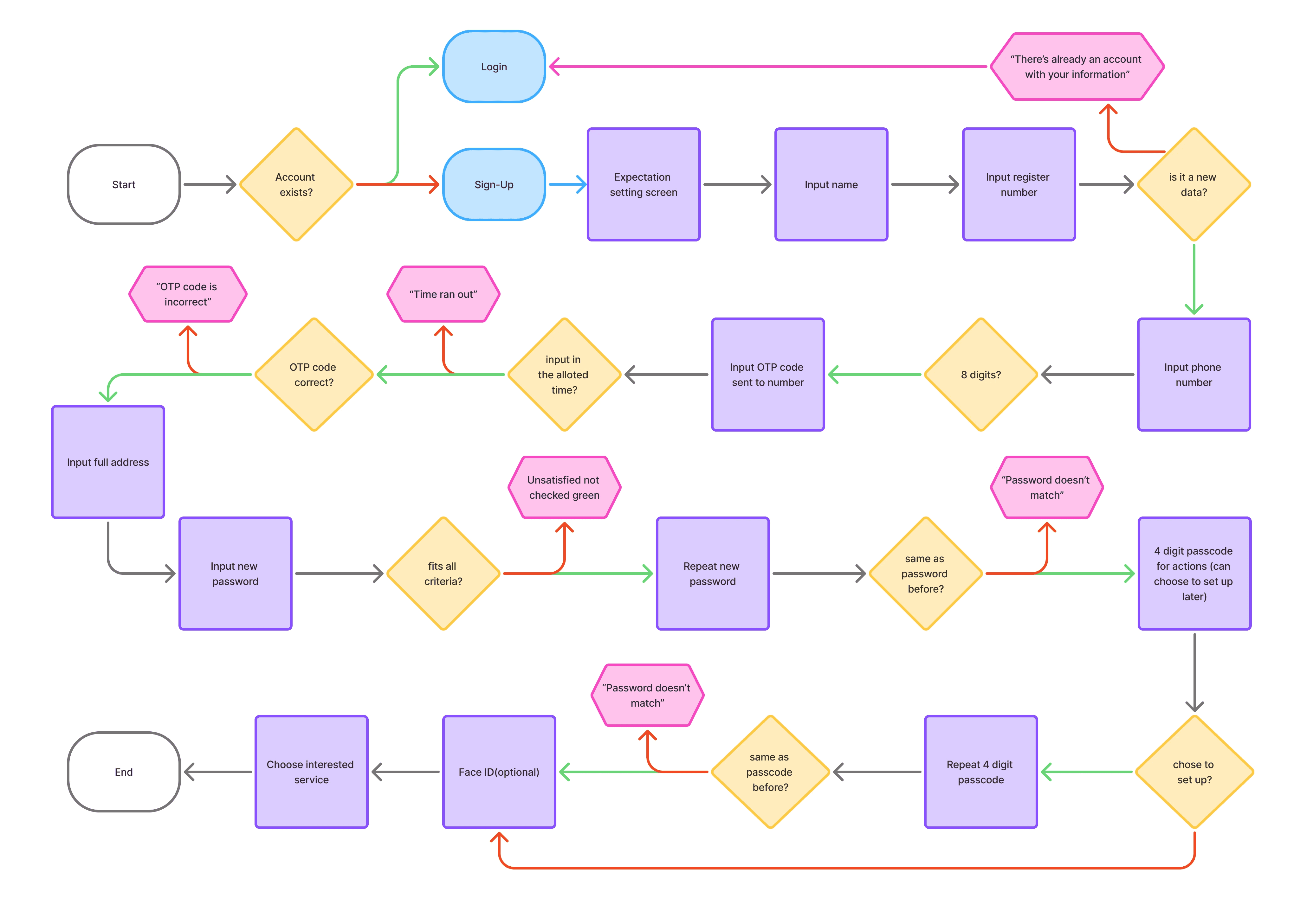
When I mapped the original flow (see below), it became clear why users felt friction early on.
What I found:
The original onboarding started with a phone number and provided no preview of upcoming steps
Users encountered early friction and surprise, increasing uncertainty
Phone-number-first signup introduced operational risk: lost or changed numbers could lead to inaccessible or duplicated accounts
Artifact: Original onboarding flow diagram
Design rationale:
Financial onboarding benefits from stable identity first, not mutable contact information
Setting expectations early reduces hesitation and abandonment
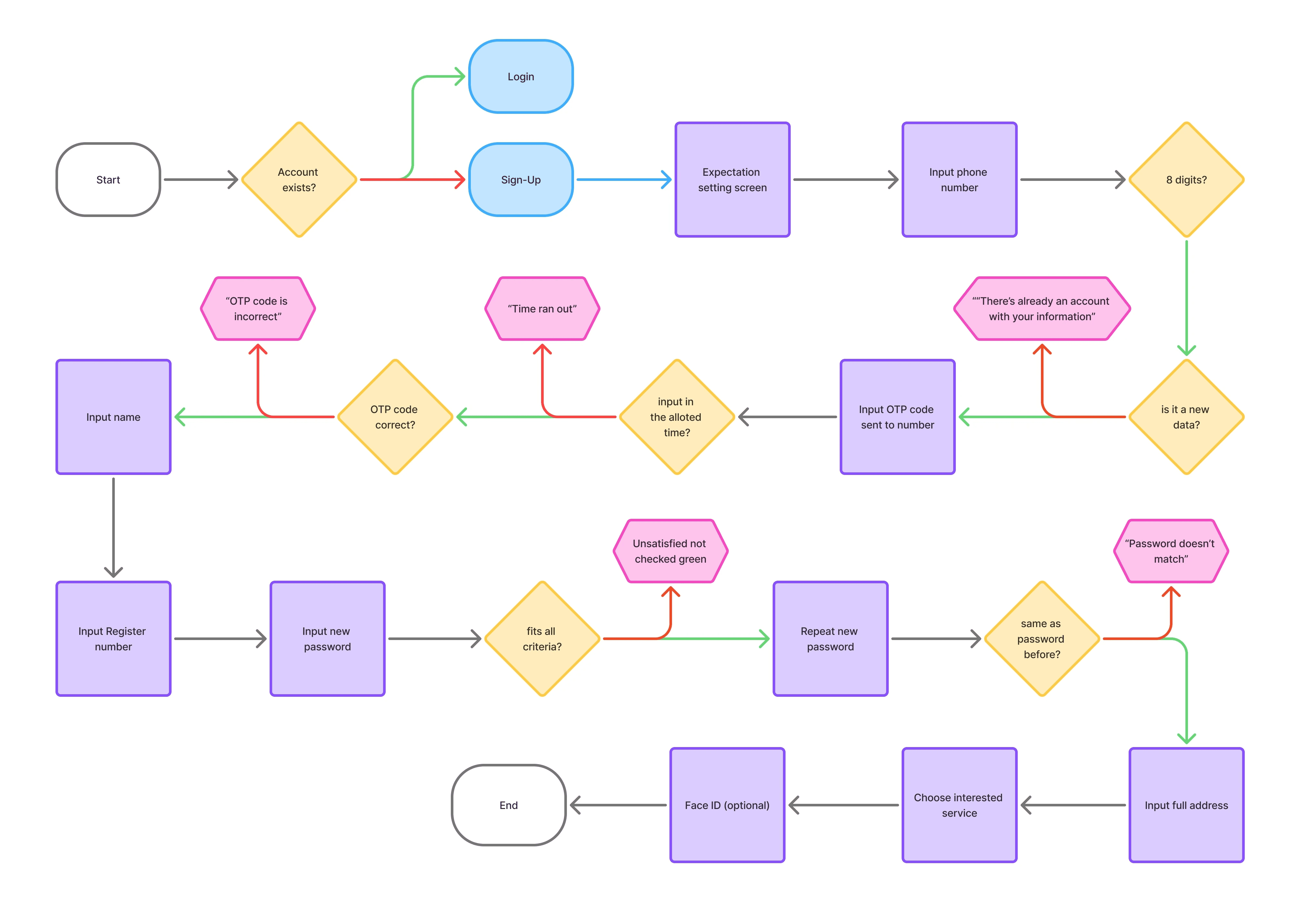
With these in mind, I redesigned the onboarding flow to tackle this issue
What I changed:
Added an expectation-setting screen before forms begin
Reordered steps to collect identity first
Collected full address during sign-up to prevent blockers during loan applications
Recommended Face ID login for faster, more secure access
Strengthened UI affordances and error-prevention patterns
Artifact: Proposed onboarding flow diagram
Artifact: Implemented onboarding flow diagram
Shipped: full address entry, Face ID login, improved affordances
Staged: larger structural changes pending validation
Design Opportunity
Let users explore before committing
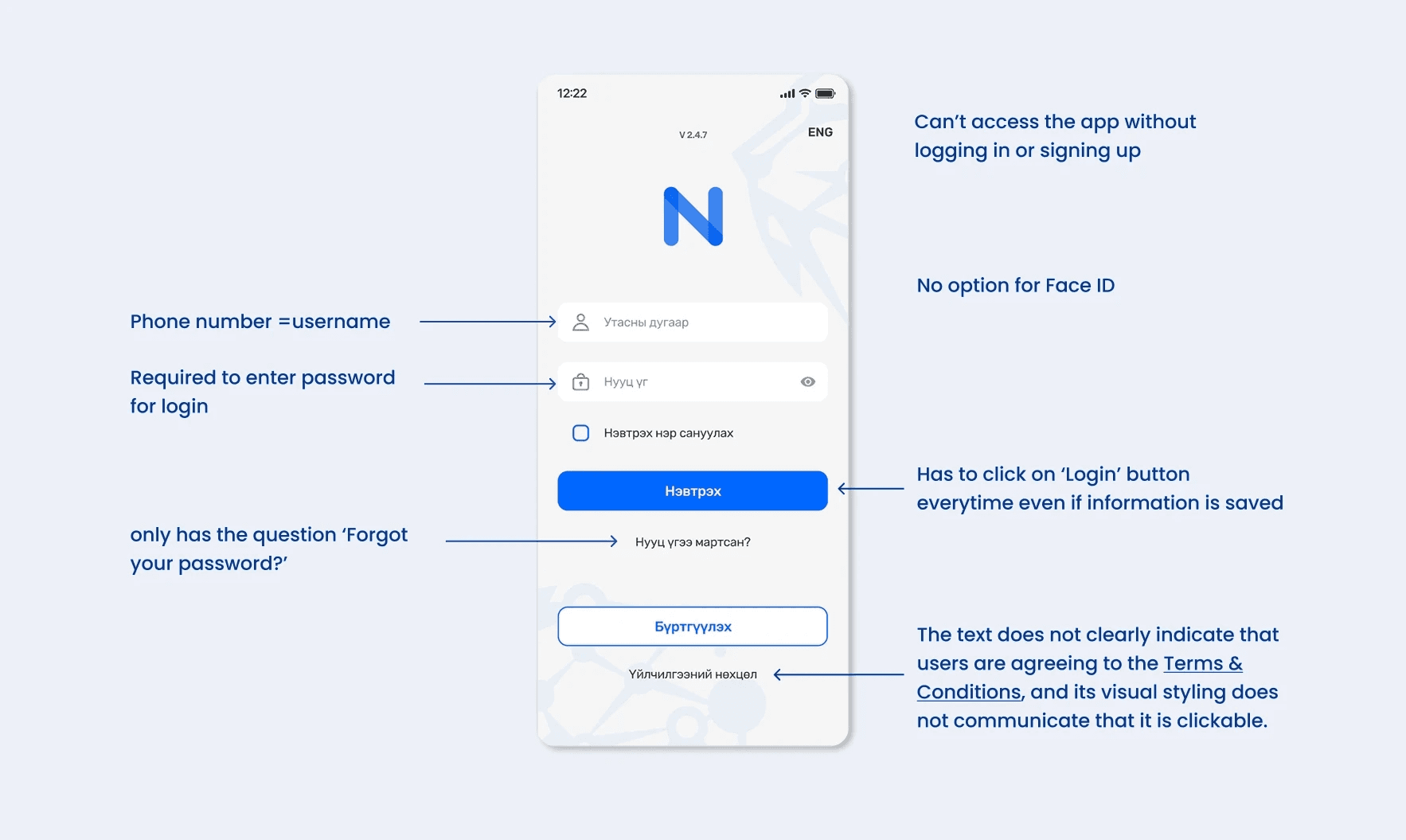
Friction Point: Forced Sign-Up Before Value
Users were required to create an account before seeing any product value
All users were forced through the same sign-up flow, regardless of intent
This created friction, reduced trust, and contributed to early drop-off
Artifact: Original screen (annotated)
Design rationale:
Users are more likely to commit after understanding what they gain
Financial apps should feel supportive, not coercive
Allowing exploration builds trust before requesting credentials
To make the experience more welcoming, I proposed a tailored approach
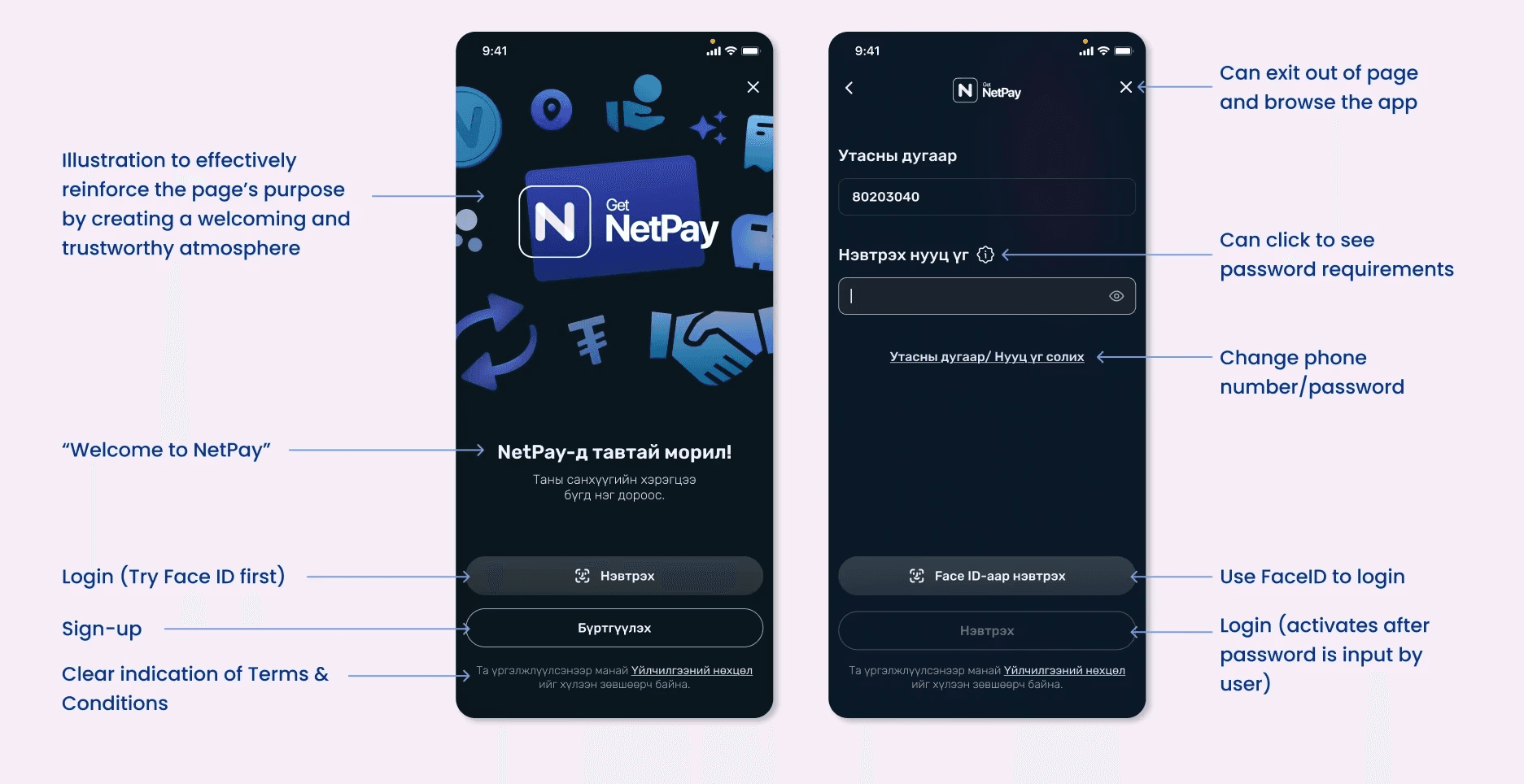
Proposed changes:
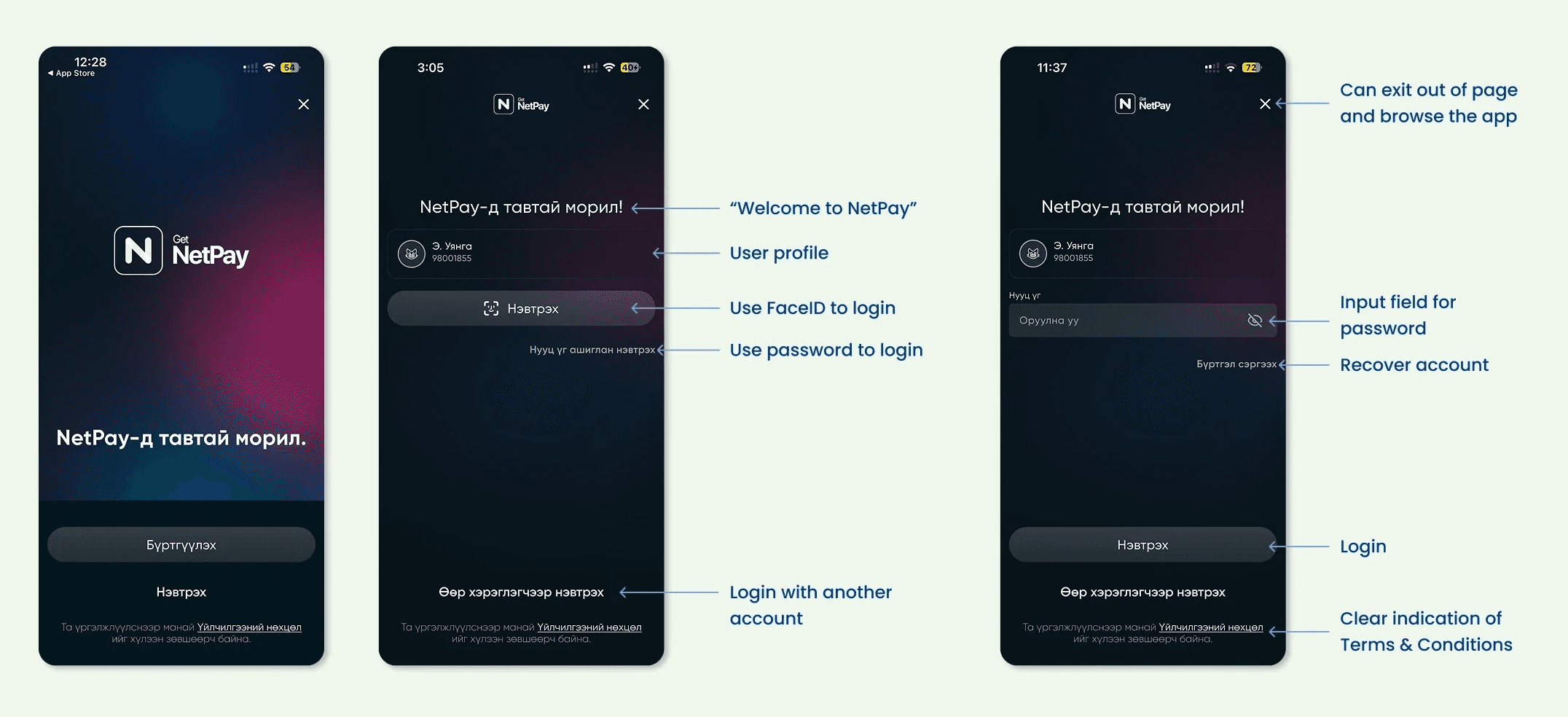
Allowed users to explore the app without signing up
Added clearer password requirement reminders to reduce errors
Introduced Face ID as an optional setup step
Recommended automatic Face ID login to remove unnecessary taps
Artifact: Proposed screens (annotated)
What shipped:
Clearer wording and improved placement across onboarding
Skip sign-up option for first-time users
Smoother Face ID login flow
Ability to sign in with a different account (reintroduced by the team)
Not shipped: password requirement reminder
Artifact: Implemented screens (annotated)
Design Opportunity
Making Every Action Feel Intuitive
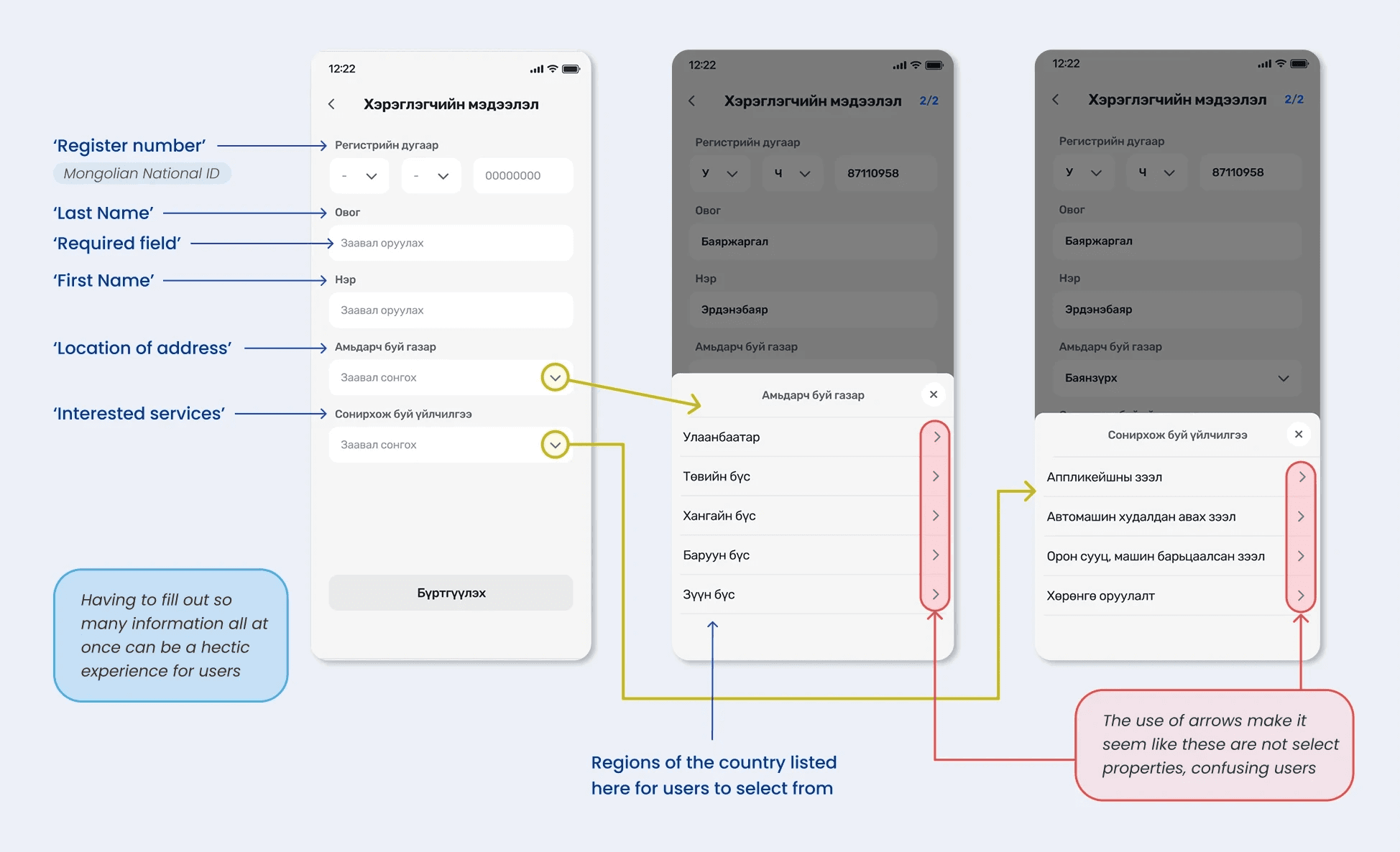
In the old onboarding experience, there were a number of UI affordances, and the single-page form was overwhelming which caused cognitive overload.
Friction Identified:
Single-page form caused cognitive overload
Misleading affordances: arrow icons suggested navigation instead of selection
Address collection was incomplete early, then repeated later
Artifact: Original screens (annotated)
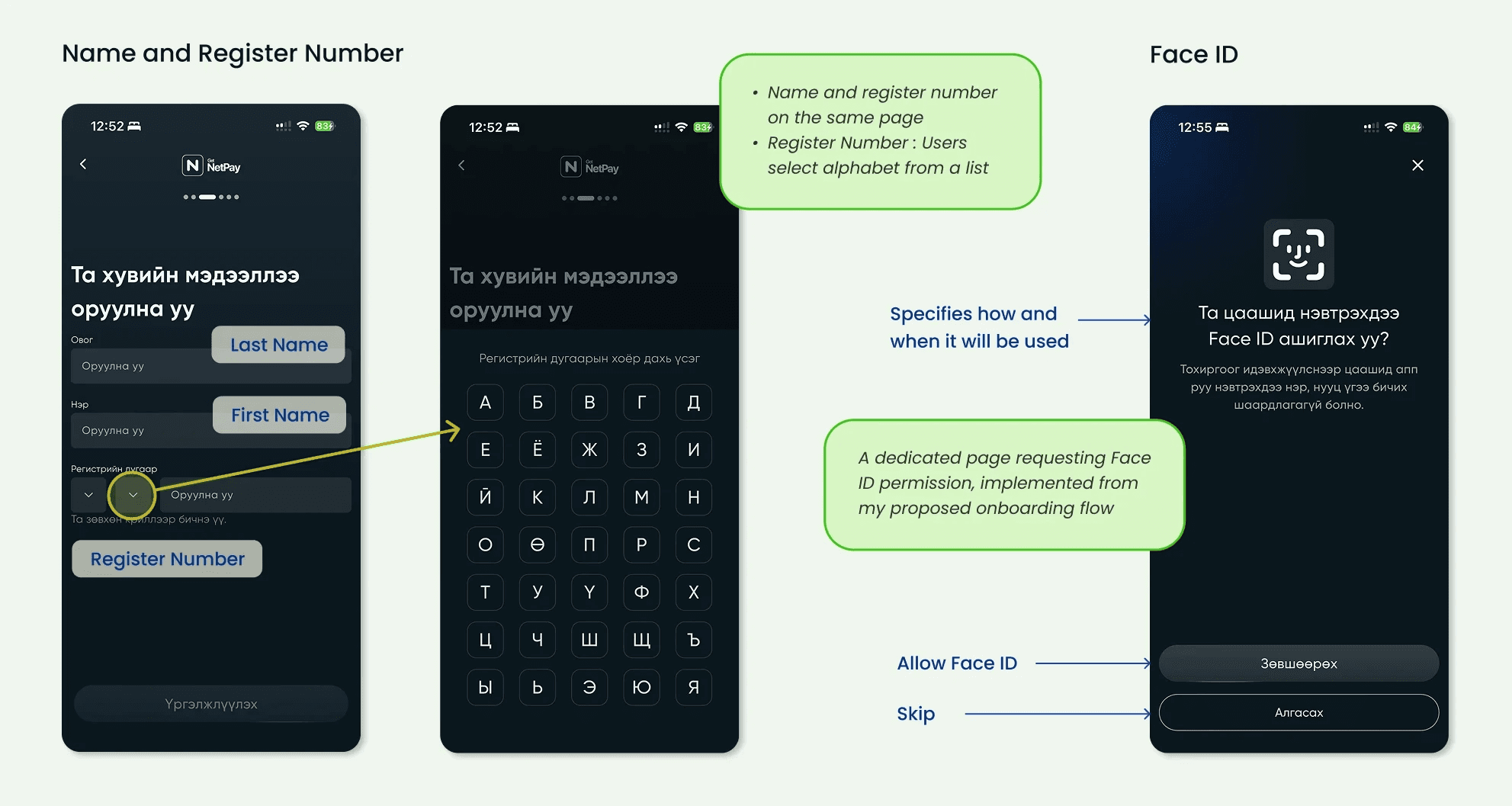
Register Number input: exploration & decision
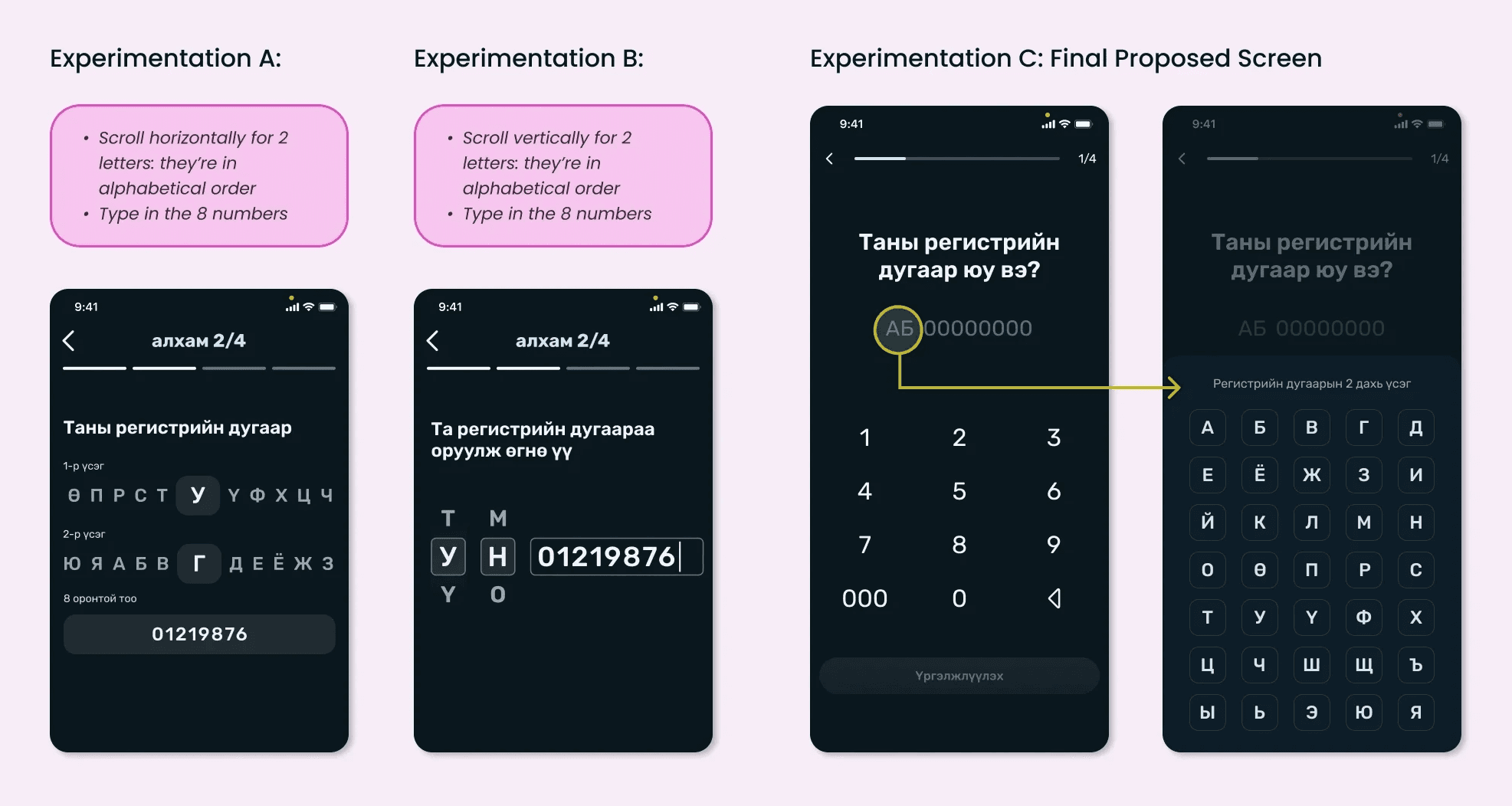
While working on this flow, I explored ways to make entering the Register Number, the Mongolian National ID, feel more intuitive.
The Register Number has a fixed structure (2 letters + 8 numbers)
Explored:
Typed numeric input
Horizontal and vertical scrolling for letter selection
After usability testing and designer review:
Kept list-based selection for clarity and lower error risk
Prioritized familiarity over novelty for critical identity inputs
Artifact: Register Number input explorations
Address input: exploration & tradeoffs
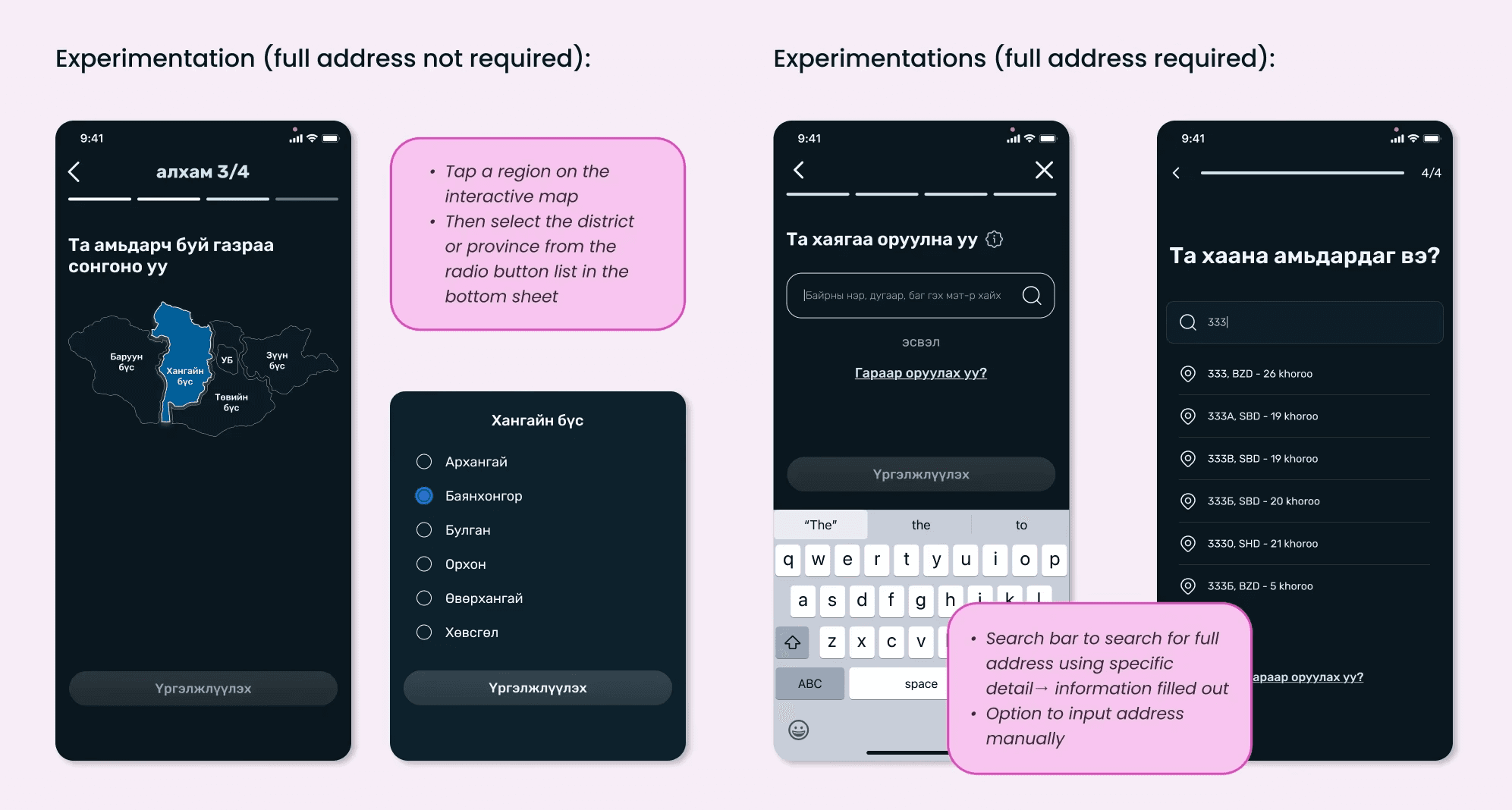
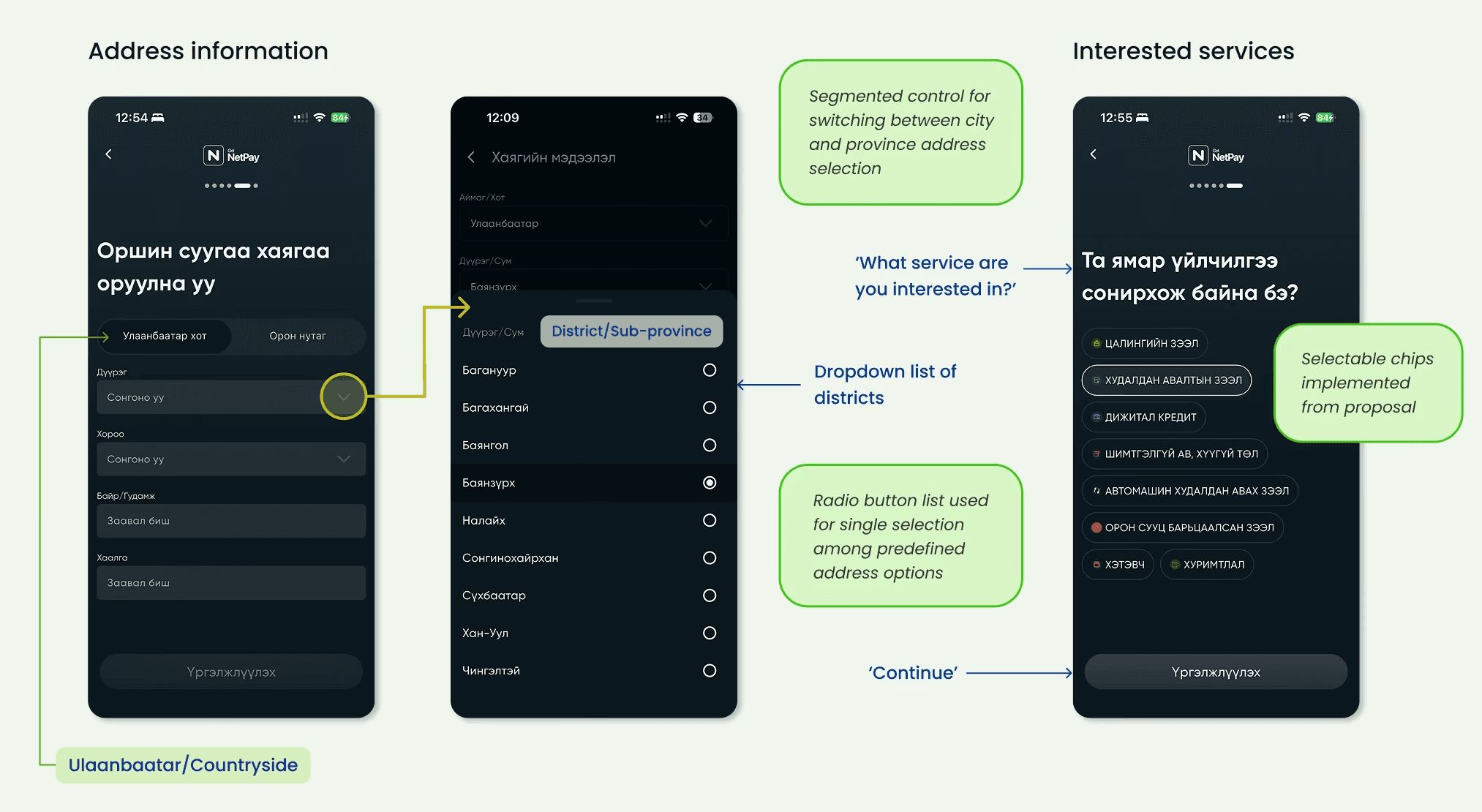
Another key consideration was address input. Previously, users were only asked to select their region, and this action relied on a confusing arrow based UI that made it unclear how to proceed.
Initial issue: region-only selection with unclear arrow-based UI
Explored:
Interactive map + province/district dropdown
Search-based address field with auto-complete
Final direction (after stakeholder alignment):
Collect full address at sign-up to prevent future blockers
Reduce repetition when users apply for loans
Artifact: Address input explorations
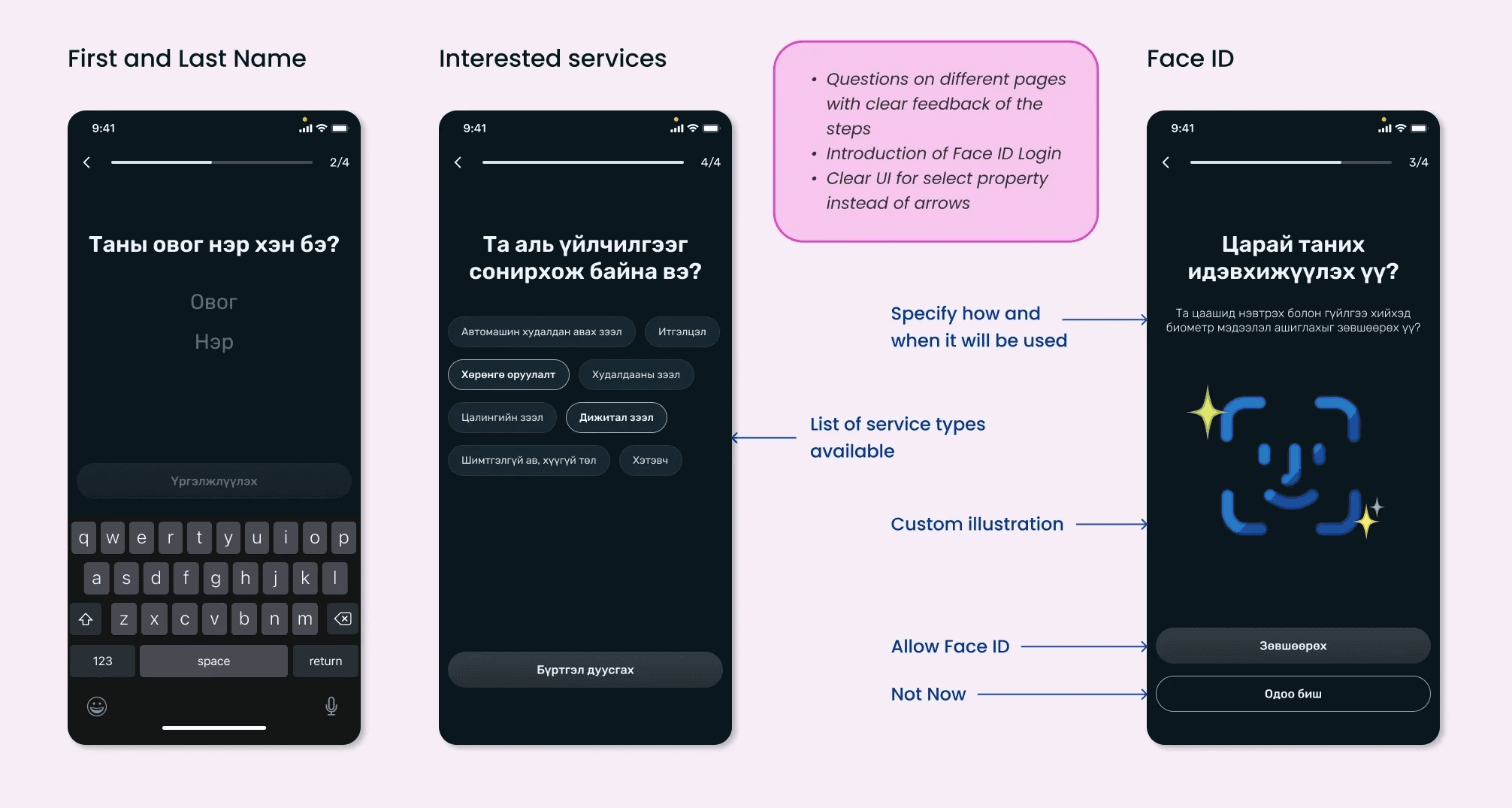
Flow & Interaction Improvements
Added progress indicators to show position and reduce uncertainty
Broke the flow into smaller, digestible steps
Introduced selectable chips for interested services
Added a dedicated Face ID opt-in step to reinforce transparency
Designed a custom illustration aligned with existing success-state visuals
Artifact: Sample onboarding screens
Final implementation
Name and Register Number grouped on a single screen
Added instructional copy (Cyrillic reminder) to reduce input errors
Face ID implemented later in the flow, after required data entry
Address input implemented via:
Segmented control (Ulaanbaatar vs. countryside)
Contextual radio buttons and text fields
Interested services shipped with icon-enhanced selectable chips
Artifact: Implemented screens (annotated)
Artifact: Implemented screens (annotated)
Design Opportunity
Building Trust Through Secure Setup
Why This Matters
Because NetPay manages sensitive financial data, onboarding must establish trust through clarity, security, and error prevention.
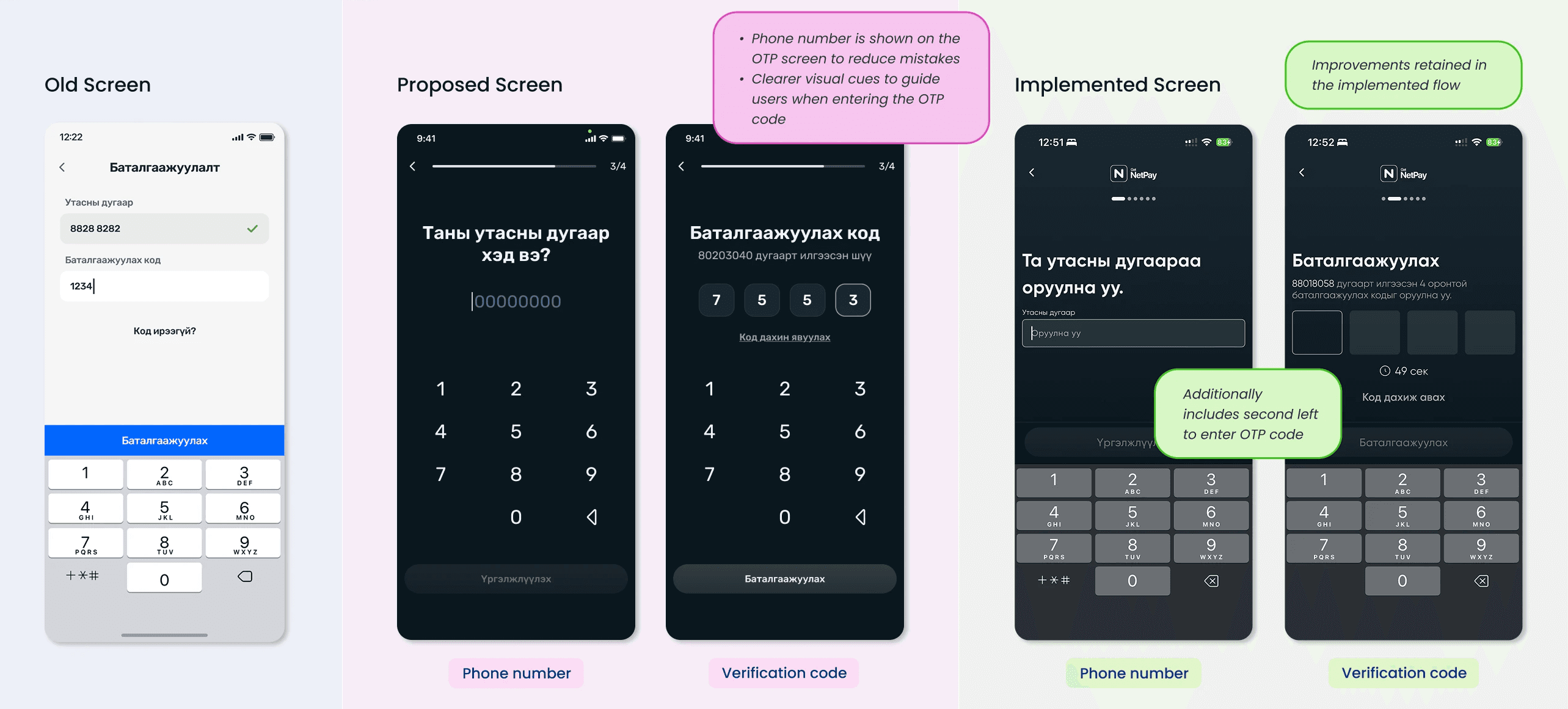
Phone Number & OTP Verification
Proposal: Move phone number + OTP verification after personal information entry to reduce early friction.
Constraint: Final implementation retained this step first due to system limitations.
Implemented:
Clear, reassuring copy and error-prevention patterns
Added OTP countdown timer, reducing uncertainty during verification
Artifact: Phone number & OTP screens (annotated comparison)
Password Creation
Usability Issues Identified
Requirements not visible while typing
No instructional guidance
Double-tap CTA added unnecessary friction
Design Decisions
Made password requirements:
Fully visible
Scannable
Paired with real-time visual validation
Proposed single-entry password creation, relying on clear validation instead of redundancy
Artifact: Password screens (annotated comparison)
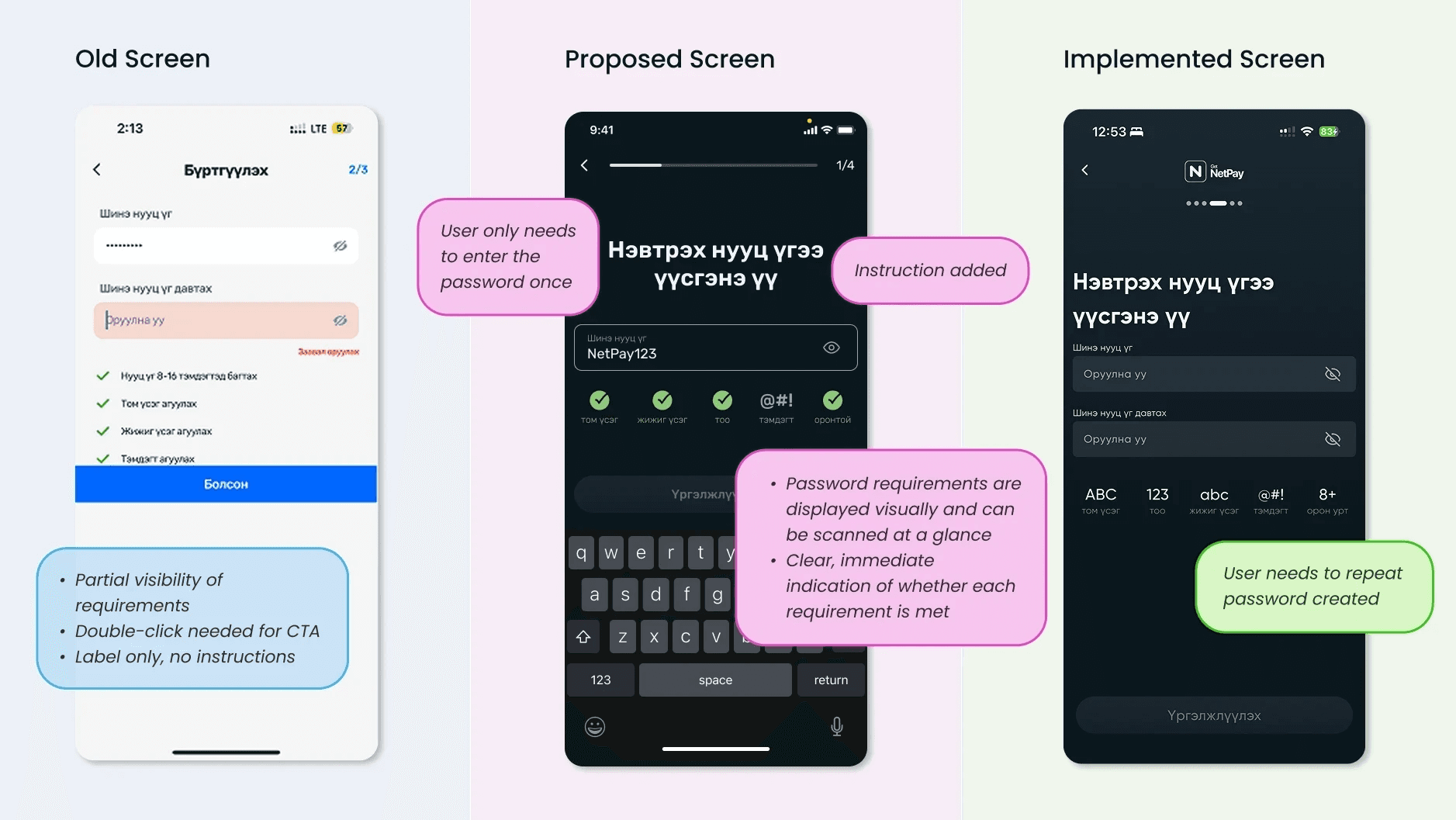
Artifact: PIN code proposal (annotated)
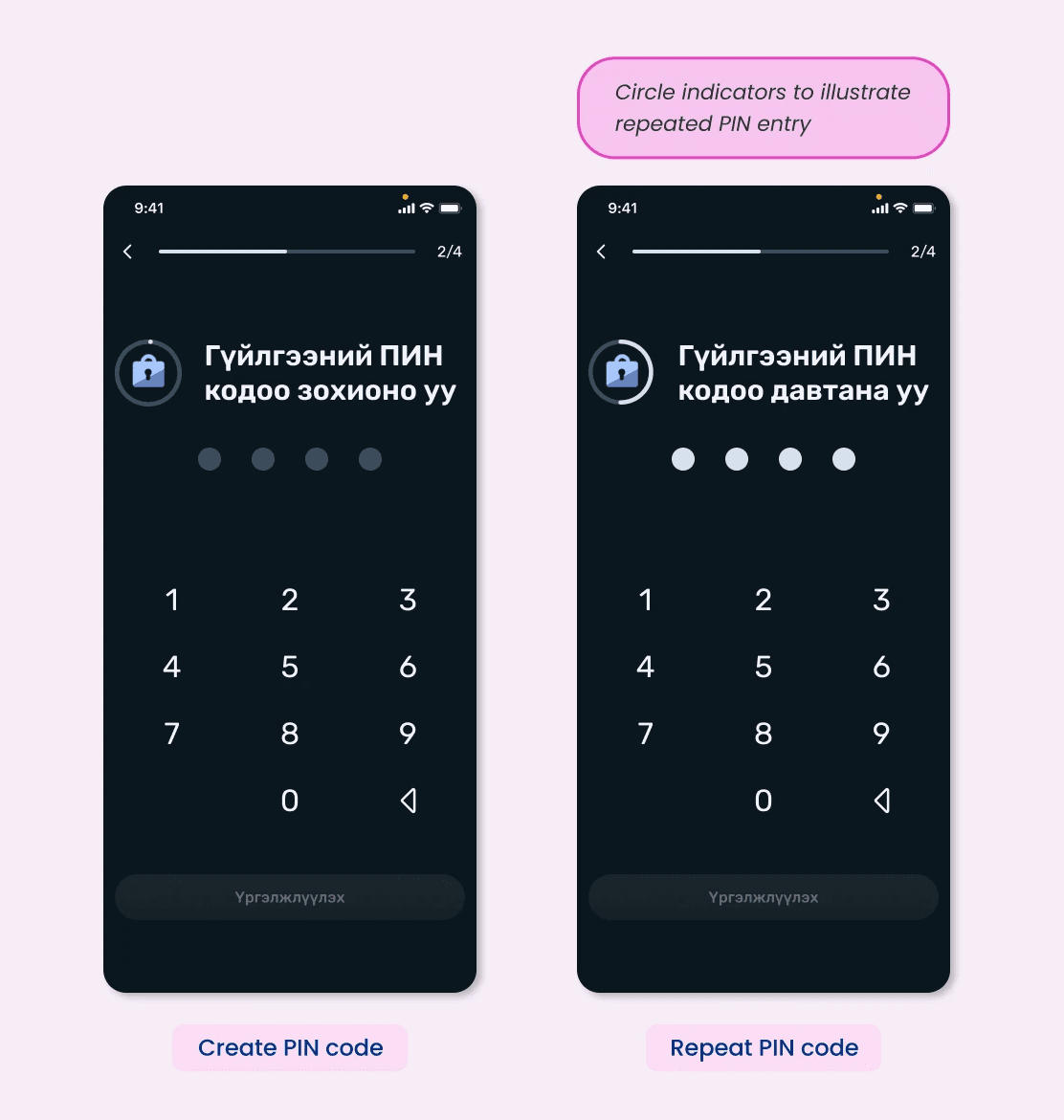
PIN Setup & Secure Access
Original Flow: PIN prompted only when users attempted a secure action.
Proposal: Introduce PIN creation during onboarding to:
Establish expectations earlier
Reduce friction later in the experience.
Result: Not added to onboarding, but insights influenced PIN screen improvements
PIN Screen Enhancement
“Create PIN” and “Repeat PIN” screens differed by only one word
Introduced:
Illustration with circular indicators
Clear visual cue for repetition
Reduced confusion and reinforced task completion
Design Opportunity
Using Visual Feedback to Guide & Reassure Users
Why This Matters:
Because onboarding involves multi-step data entry and financial actions, users need clear confirmation and reassurance to stay confident and engaged.
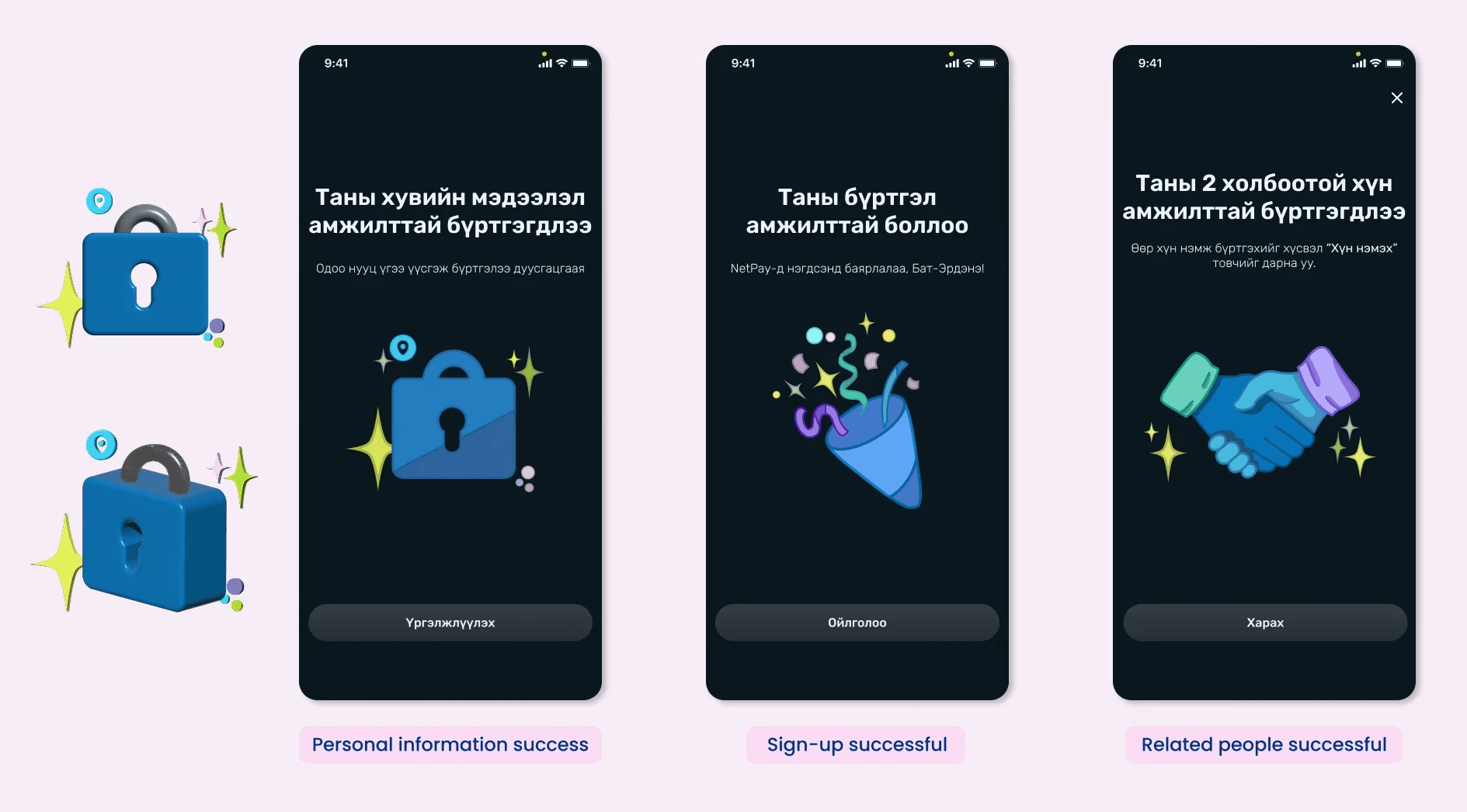
Visual Confirmation & Progress Feedback
Observations
Users completed important steps without clear confirmation
Lack of feedback increased uncertainty about progress
Design Decisions
Introduced illustrations at key success moments to confirm completion
Applied the visibility of system status heuristic to ensure feedback was functional, not decorative
Reused the illustration pattern across screens to create consistency
Artifact: Success screens with custom illustrations
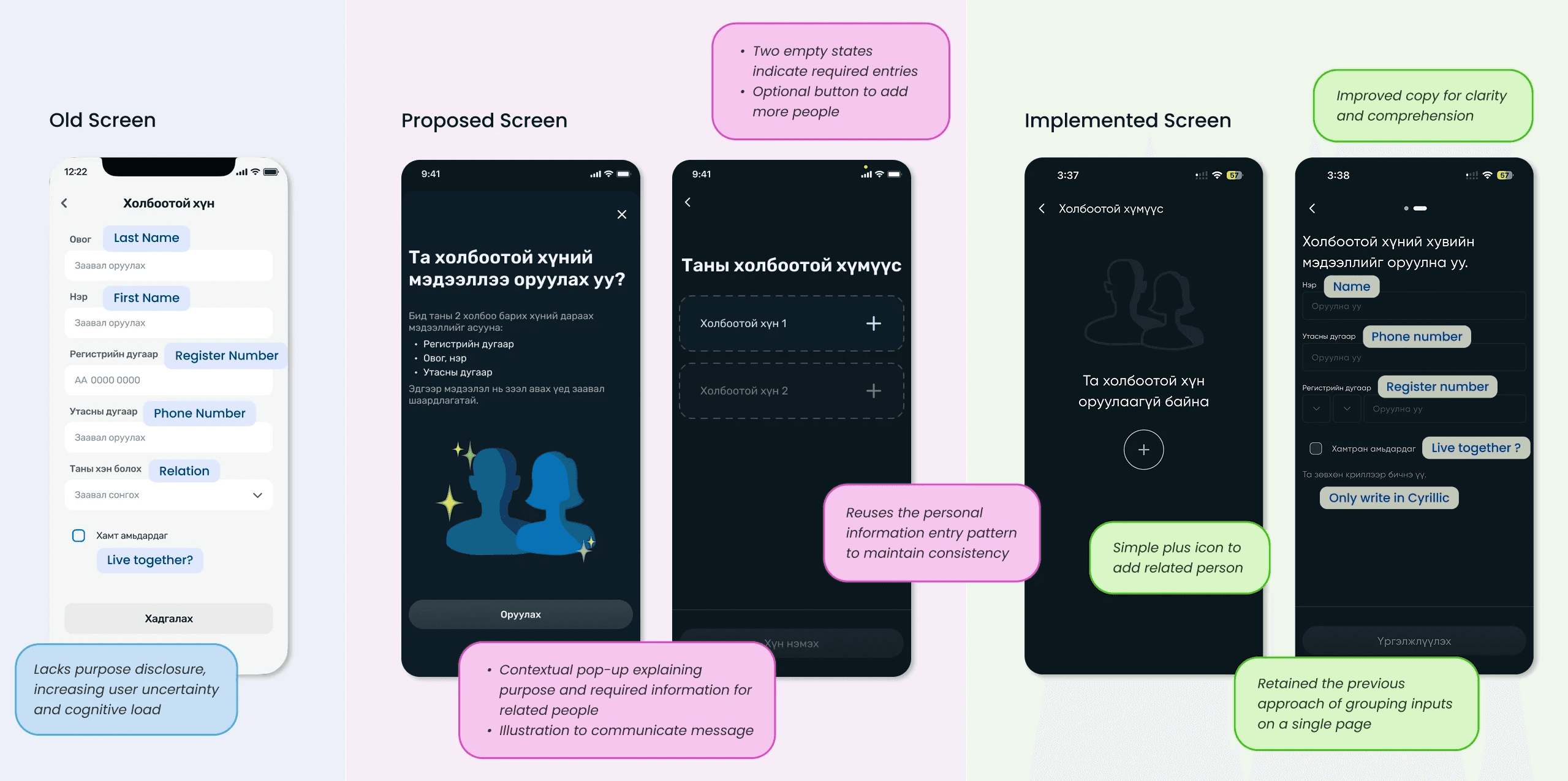
Reducing Friction in Required Related People Information
Observations
Requirement appeared late, causing surprise
Purpose of the information was unclear
Multi-person input lacked structure and clarity
Design Decisions
Proposed surfacing the step earlier with a skip option (progressive disclosure)
Clarified intent upfront to build trust
Explored step-based entry to clearly separate information for multiple people
Artifact: Related people onboarding and information screens (annotated)
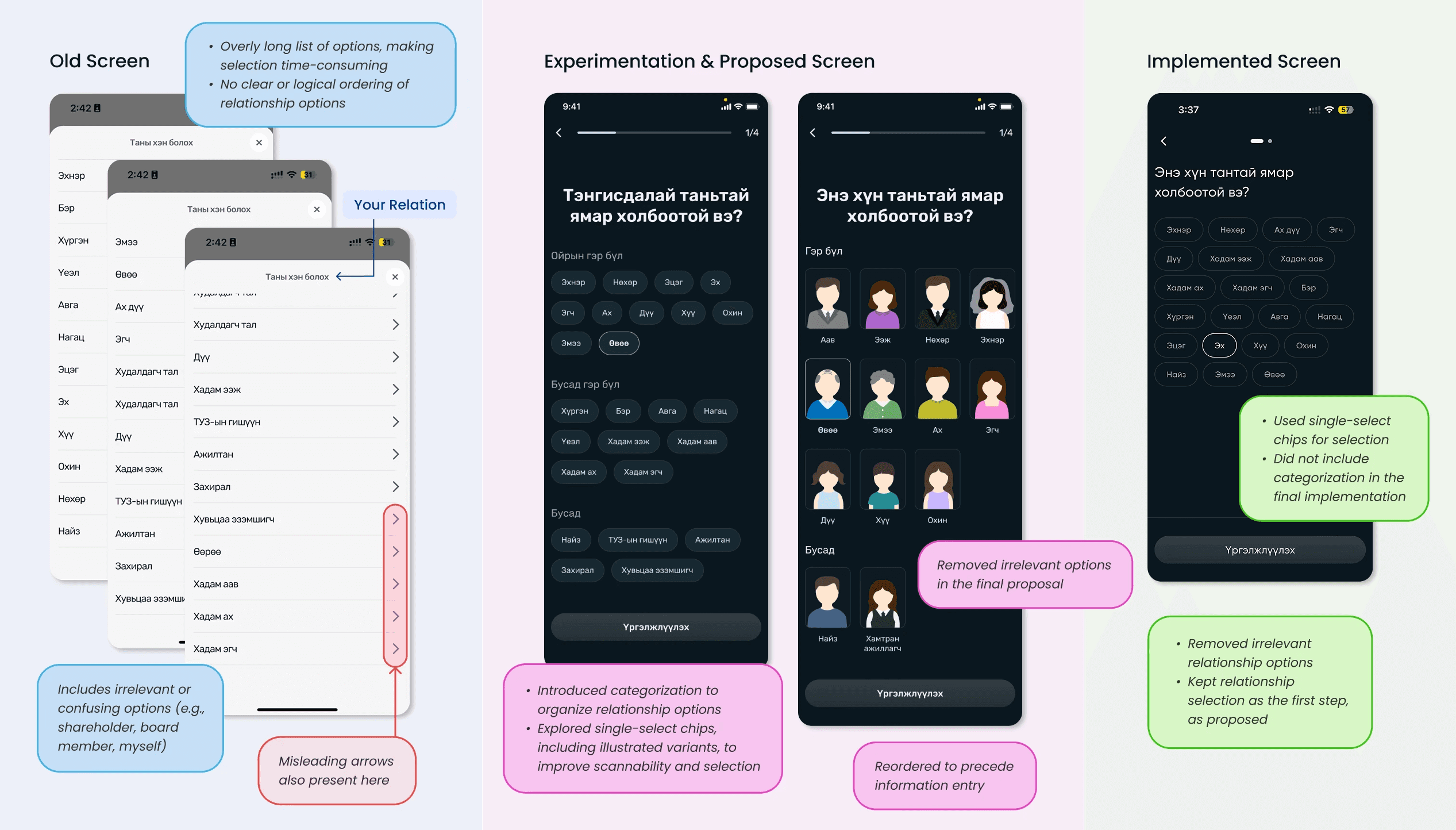
Improving Relationship Selection Scannability
Observations
Long, unordered relationship lists increased cognitive load
Irrelevant options made selection frustrating
Design Decisions
Categorized relationships to improve scanning
Explored single-select chips and illustrated options
Collaborated with the Product Owner to remove unnecessary choices
Lessons from the Process
Setting expectation reduces anxiety early
Progressive disclosure is about timing, not just steps
Iteration continues beyond design proposals
Preview screens, progress indicators, and clear context helped users feel oriented before committing, which is especially important in financial onboarding.
Breaking flows into smaller parts only works when aligned with system constraints and user readiness.
Seeing the product in its final state helped me recognize gaps in my thinking and sharpen how I approach future designs
Flexibility is critical in the real world
System limitations influence design outcomes
Learning continues beyond initial designs
Being adaptable to changes, feedback, and ongoing iterations helped me contribute effectively even when timelines or priorities shifted.
Some decisions (phone-number-first verification, PIN timing) were driven by existing infrastructure, teaching me to design solutions that improve clarity even when core logic cannot change.
Observing A/B tests and internal usability evaluations, even on flows I didn’t design, highlighted how user insights shape and refine final implementations.